
Claude Can Now Work With Your NewLedger Books
Ask questions using live financial data, connect multiple companies, and prepare accounting work with human approval built in.

NewLedger Editorial
The best place to ask a question about your business may be the AI assistant already open on your screen.
That is why NewLedger connects to Claude through the Model Context Protocol (MCP). Once authorised, Claude can answer questions using your live books, retrieve reports, and prepare accounting drafts. NewLedger remains the system of record: permissions, review, posting, and the audit trail stay where they belong.
Because the connection uses an open protocol, Claude is a choice rather than a lock-in. Your team can use another compatible AI client later without rebuilding permissions or moving the books.
Your accounting layer stays stable. Your AI layer stays replaceable.
Your books, where you already work
Questions about cash, overdue invoices, or month-end should not begin with a CSV export and six open tabs. Claude can request the relevant information directly from NewLedger, work through it with you, and link the answer back to the books.
This is not a copy of your accounts uploaded to a chat. Claude calls purpose-built tools against current NewLedger data, within the access you approve.
What Claude can do with NewLedger
After you approve the connection, ask questions in normal language. Claude retrieves the right NewLedger records and reports behind the scenes.
| Ask Claude | NewLedger provides |
|---|---|
How has gross margin changed over the last six months? | Current figures and the underlying trend |
Which customers are more than 60 days overdue? | Receivables, balances, and collection priorities |
Prepare July's retainer invoice using last month's line items. | A structured draft for your team to review and send |
Summarise unusual movements before month-end close. | Exceptions with supporting transactions ready to inspect |
Bring more than one company
Every NewLedger company has its own MCP endpoint, consent, and permissions. Add each endpoint to Claude and keep the connections available side by side, up to Claude's own connection limit.
For an accounting firm, that can mean separate connections for different clients. For a finance team, it can mean the operating company, holding company, and regional entities. Choose the company relevant to the question without weakening the boundary between them.
Each company remains isolated. Claude simply has access to the connections you have separately authorised.
Controlled write tools, not unrestricted access
NewLedger lets Claude prepare useful accounting work without giving it unrestricted posting authority.
| Available write tool | What Claude prepares |
|---|---|
| Draft invoice | Customer, line items, amounts, tax, and notes |
| Draft bill | Vendor bill details ready for review |
| Draft expense | Vendor, amount, category, and supporting notes |
| Draft journal | Proposed accounts, debits, credits, and narration |
Every write is scoped, draft-only, and reviewable. NewLedger records the activity, and an authorised person decides what is posted. Revoke a connection at any time.
Connect Claude to NewLedger
If you already use NewLedger:
- Open Settings → App Connect → MCP Server
- Copy the MCP server URL for the current company
- In Claude, open Settings → Connectors → Add custom connector and paste the server URL
- Approve the OAuth connection and enable the NewLedger tools you want to use
- Start with a question about cash or receivables
- When you are ready, ask Claude to prepare a draft and review it in NewLedger
Anthropic maintains the current instructions for adding a custom connector to Claude, including the additional organisation-level step for Team and Enterprise plans.
To connect another company, switch company in NewLedger, copy its MCP endpoint, and add another connection. Repeat for as many companies as your AI client supports; the first company stays connected.
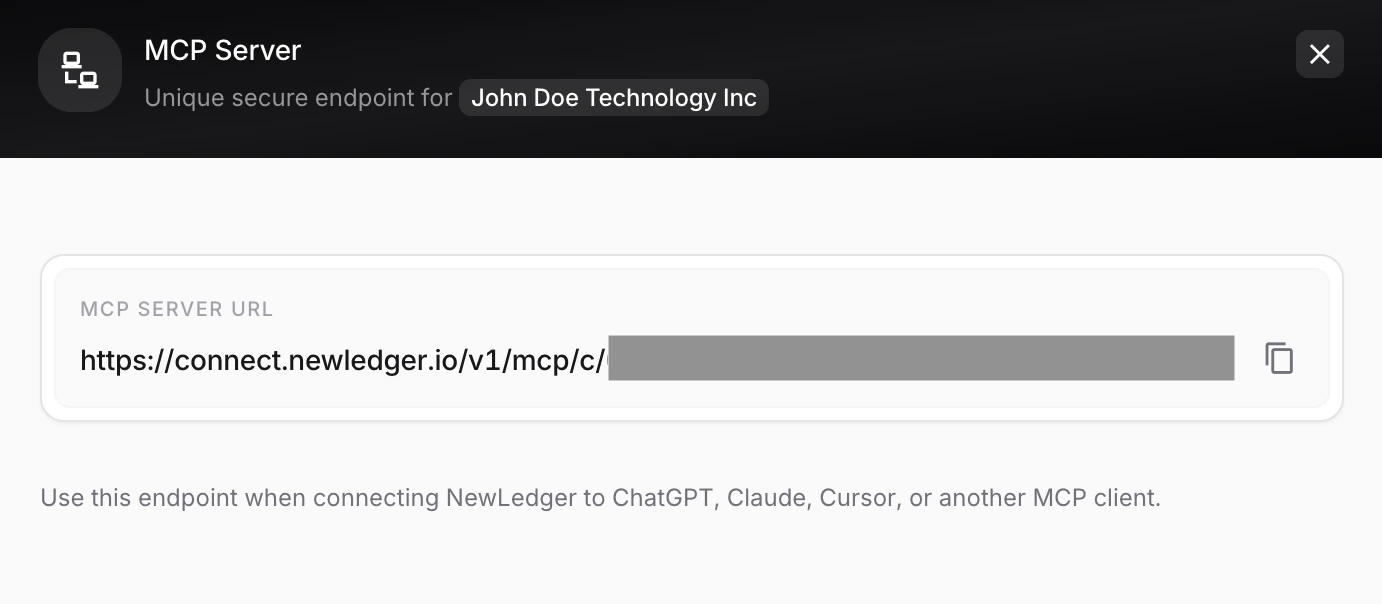
Your company-specific MCP server URL is available inside Settings → App Connect → MCP Server.
For a fuller walkthrough of the available tools and safeguards, read MCP for Accounting: Your AI Assistant Can Now Work With Your Books. If you are building a server-side automation rather than connecting an AI client, see API credentials vs OAuth 2.0 in NewLedger.
Ask the question. Keep control of the answer.
Claude makes it easier to understand the books and prepare the next step. NewLedger keeps the records, permissions, review, and final decision in one trusted place.
Let the AI do the setup. Let your team decide what reaches the ledger.
Already on NewLedger? Connect Claude from Settings → App Connect → MCP Server. New to NewLedger? Start a 14-day free trial or talk to us about your AI accounting workflow.
More in Product
One Modern Import Workflow, Across NewLedger
Turn messy source files into clean, reviewable records—without rigid templates, frozen browsers, or blind bulk uploads.
Read articleMicrosoft Copilot Can Now Work With Your NewLedger Books
Bring live accounting context into the Microsoft 365 workflows your finance team already uses—with company-scoped access and controlled writes.
Read articleMCP for Accounting: Your AI Assistant Can Now Work With Your Books
NewLedger now supports the Model Context Protocol, so you can ask Claude or any compatible AI client to pull reports, draft invoices, and categorise transactions — without ever handing it the keys.
Read article