
Microsoft Copilot Can Now Work With Your NewLedger Books
Bring live accounting context into the Microsoft 365 workflows your finance team already uses—with company-scoped access and controlled writes.
NewLedger Editorial
Finance teams already spend much of their day in Microsoft 365. The numbers may live in the accounting system, but the questions arrive in Teams, the analysis happens in Excel, and the commentary takes shape in Word or PowerPoint.
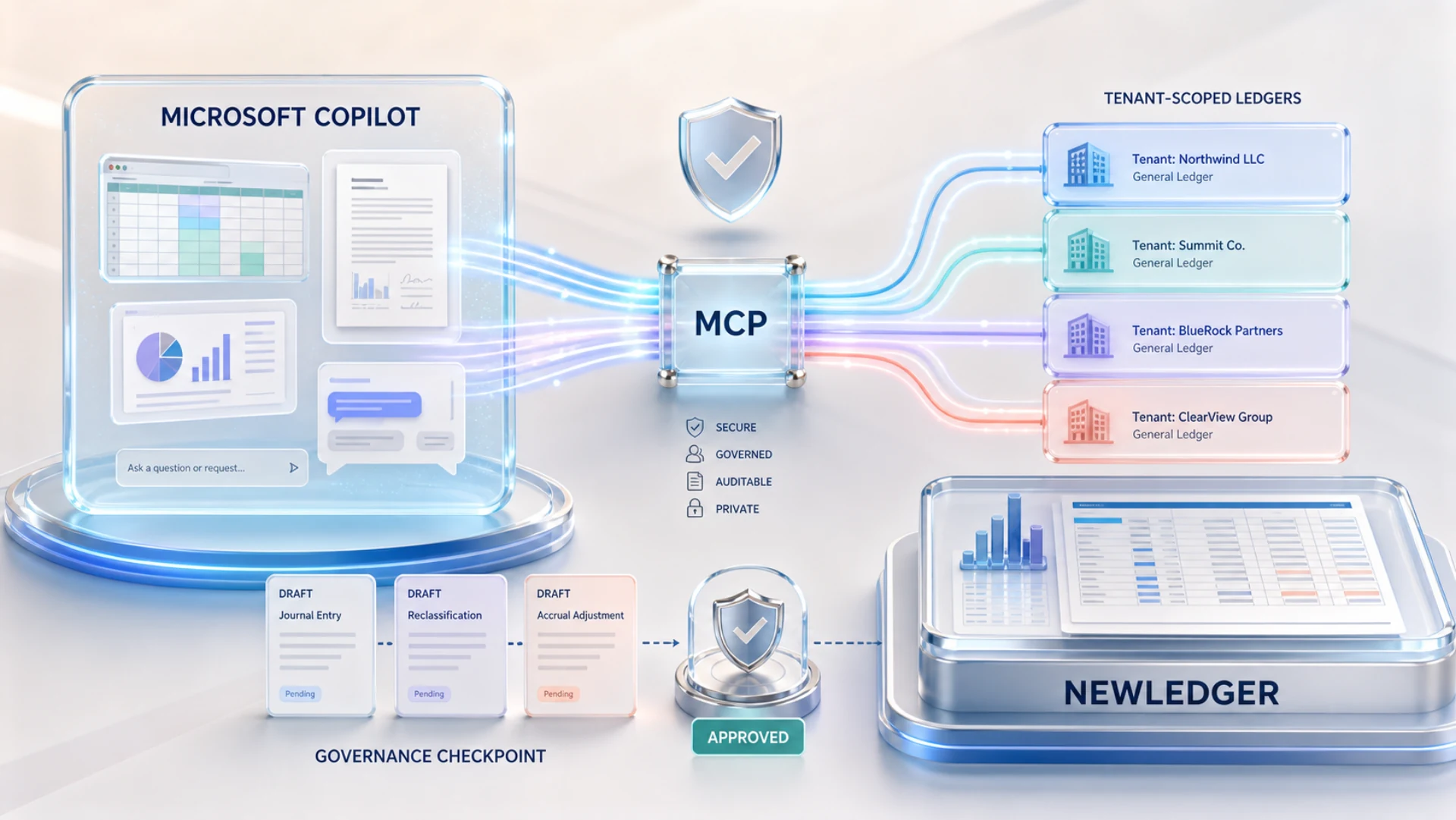
NewLedger brings those worlds closer together. Connect a Microsoft Copilot Studio agent to NewLedger through the Model Context Protocol (MCP) and it can work with current accounting context, retrieve reports, and prepare structured drafts.
NewLedger remains the system of record. Permissions, human review, posting, and the audit trail stay where they belong.
Accounting context in your Microsoft workflow
A Copilot agent can call NewLedger tools when a finance question needs an answer from the books. Instead of exporting data first, you can begin with the question and let the agent retrieve the relevant records or report.
The result is a more useful finance assistant: one that can move from conversation to evidence, then prepare the next step without bypassing your accounting controls.
What Microsoft Copilot can do with NewLedger
| Ask your Copilot agent | NewLedger provides |
|---|---|
Summarise cash, receivables, and overdue customers for this week's review. | Current balances and collection priorities |
Explain the largest expense movements before month-end close. | Relevant reports and supporting transactions |
Prepare the usual monthly invoice for Northstar. | A structured invoice draft for review |
Draft management commentary from this month's P&L. | Current financial context for a clearer first draft |
Copilot handles the conversation and reasoning. NewLedger supplies the governed accounting context.
One agent, company-scoped connections
Every NewLedger company has its own MCP endpoint, consent, and permissions. A Copilot Studio agent can be configured with the company connections your organisation approves, while NewLedger keeps each tenant boundary intact.
For an accounting firm, that can mean authorised access to several client companies. For a group finance team, it can mean separate operating entities. Each connection remains independently authorised and can be revoked without affecting the others.
Controlled writes, ready for review
NewLedger confidently exposes useful write tools because their boundaries are clear:
| Write tool | Result in NewLedger |
|---|---|
| Draft invoice | Customer and line items ready to check and send |
| Draft bill | Vendor bill details ready to review |
| Draft expense | Amount, category, and notes ready to confirm |
| Draft journal | Proposed debits, credits, and narration ready to approve |
These tools do not give an agent unrestricted posting authority. Every write is scoped, draft-only, and reviewable. NewLedger records the activity, and an authorised person decides what reaches the ledger.
Connect NewLedger to Microsoft Copilot
- In NewLedger, open Settings → App Connect → MCP Server
- Copy the MCP server URL for the current company
- In Microsoft Copilot Studio, open your agent and go to Tools → Add a tool
- Follow Microsoft's guide to connecting an existing MCP server and use the recommended MCP onboarding wizard
- Enter the NewLedger server details and choose OAuth 2.0 → Dynamic discovery
- Select the tools the agent may use, test the connection, and publish it to the Microsoft 365 channels approved by your organisation
Microsoft 365 availability, licensing, and admin approval depend on your organisation's setup. Microsoft also documents how to manage the MCP tools exposed to an agent.
The simplest OAuth setup: Dynamic discovery
NewLedger supports OAuth 2.0 Dynamic Client Registration (DCR) with discovery. Choose Dynamic discovery in the Copilot Studio onboarding wizard and Copilot Studio can discover the required OAuth endpoints and register the client automatically.
This is the better default: there is no client ID or secret to copy and no Power Apps custom connector to build or maintain by hand. Microsoft's manual and custom connector routes remain available for organisations with advanced requirements.
To add another company, repeat the process with that company's endpoint and authorisation. The first connection stays separate.
For the provider-neutral architecture and full tool surface, read MCP for Accounting: Your AI Assistant Can Now Work With Your Books. If you are building a server-side process instead of an interactive Copilot agent, see API credentials vs OAuth 2.0 in NewLedger.
Let Copilot prepare. Let your team decide.
Microsoft Copilot can bring financial questions into a workspace your team already knows. NewLedger keeps the source data, permissions, review, and final decision in one controlled accounting system.
The agent can do the groundwork. Your team keeps authority over the books.
Already on NewLedger? Copy your company endpoint from Settings → App Connect → MCP Server. New to NewLedger? Start a 14-day free trial or talk to us about your Microsoft Copilot workflow.
More in Product
One Modern Import Workflow, Across NewLedger
Turn messy source files into clean, reviewable records—without rigid templates, frozen browsers, or blind bulk uploads.
Read articleClaude Can Now Work With Your NewLedger Books
Ask questions using live financial data, connect multiple companies, and prepare accounting work with human approval built in.
Read articleMCP for Accounting: Your AI Assistant Can Now Work With Your Books
NewLedger now supports the Model Context Protocol, so you can ask Claude or any compatible AI client to pull reports, draft invoices, and categorise transactions — without ever handing it the keys.
Read article